What you'll learn in this article:
- What if I have additional questions about applications and screening?
- Why can't I use applications?
- I deactivated my listing. Why am I still receiving applications?
- How do I download and print their application for my records?
- What do “Invited to apply” and “Application in progress” mean? Why are there different application categories?
- A renter said they applied. How do I view their application?
- Can I edit the Zillow application or use my own application?
- Does verifying my identity affect my credit score?
- What if the applicant doesn’t have a social security number?
- How can I make sure that I use the criminal background check in a way that promotes fair housing?
- What if an interested renter hasn’t purchased an online application, yet?
- How is this information kept safe?
- Will I have to collect their social security number?
- ICRAA Overview: What is ICRAA? Who is covered by ICRAA? Is my Zillow Application covered by ICRAA?
- How do roommates apply together?
- What questions are included in the online application? Can I see a sample?
- What is rent to income ratio?
- What does it mean that the renter has a “portable” application?
- How do I Approve an Application?
- How do I Decline an application?
- How do I contact an applicant?
- How do I disable applications?
- Why did I receive a Zillow application when I do not accept Zillow applications?
- Can I request a refund on the renter's behalf?
-
How can I help my applicant troubleshoot application issues?
What if I have additional questions about applications and screening?
Visit our help center for more FAQs or contact our support team with any questions: rentalapplications@zillow.com.
Why can't I use applications?
If you see an error message when attempting to use Zillow rental applications, or do not have access to Zillow applications at all, it may be due to one of the below reasons.
Your listing is outside of the United States
Our application feature is not available for international listings. Generally, Listings outside of the US are not currently supported on Zillow, with the exception that listings can be posted and managed through Zillow Rental Manager in some areas of Canada.
Your listing is syndicating to Zillow through a feed
Our applications feature is available to use for feed listings if you have a connected Zillow Rental Manager account. If you do not have a connected account, you will be unable to use the Zillow application service.
To connect your Zillow Rental Manager account, follow the steps below.
- Log in to Zillow Rental Manager with the same email address you use as the contact email for your feed listings here: https://www.zillow.com/rental-manager/
- Click "Get Started", so we can verify your email address.
Once your email has been verified, you will see your feed listings in your Zillow Rental Manager account, and you will be able to activate the rental application feature from there.
To activate the application feature, simply select Yes to Receive Zillow applications? at the bottom of your edit listing page.
Note: That your Zillow account email must match your contact email on the feed listings you have posted.
Non-rental listing
Our application feature is only available to rental listings. If you would like to post your rental listing and utilize our applications feature, you can find instructions here.
Applications is unavailable for your account
Our applications feature is not currently available for your account, email us at rentalapplications@zillow.com for additional assistance.
You're a current tenant listing a room for rent
Our applications feature is only available to landlords listing rooms for rent. If you are a tenant seeking a roommate, we do not permit use of our applications feature at this time.
I deactivated my listing. Why am I still receiving applications?
If applicants on our site opened an application for your property before it was deactivated from our sites, they still have the option to submit/purchase the application after the listing is no longer available.
The application service is valid for 30 days and the applicants can submit their portable applications to any participating rental listing on our site. When they apply to your property, they are not excluded from applying to other properties as well.
If you have been in contact with the new prospective applicants, let them know that the property is no longer available. Your applicants can contact us directly if they have any questions at rentalapplications@zillow.com.
How do I download and print their application for my records?
Third-party screening information (background checks and credit reports) can be viewed up to 30 days from the time you receive the application. After you view the third-party report for the first time, you will still have access to view the information for another 30 days.
Once you have received an application from your renter and verified your identity, you will be able to print the application and credit report documents as needed for your records.
To do this, first log into your Zillow Rental Manager account, and select the property you wish to view applications for. Select your rental listing and under the Applications tab select the application you would like to view or select 'View more' to view all submitted applications. From here, select the application you wish to print and click View on either the application or credit report. On this screen, you will see the print icon on the top right-hand corner of the page. Note: Selecting print will only print the document you are on and you will need to print the other document separately.
Once you have agreed to the privacy reminder, you will be able to print your renter’s application, background check, and credit report.
What do “Invited to apply” and “Application in progress” mean? Why are there different application categories?
You can view the status of your applications in the Applications section of your listing in Zillow Rental Manager.
-
- Completed applications: This section shows submitted applications
- Applications in progress: These are applications that have been completed by at least one, but not all, applicants. After all co-applicants have applied, the application will move to Completed applications. If two or more co-applicants submit an application together, you will be notified by email when each co-applicant submits their portion of the application.
-
Invited applicants: You have two options for inviting a particular renter to apply to your property.
- Send application link allows you to specify a particular renter’s email and directly send an application. If you send a link, but the renter has not submitted the application yet, their invite will appear here.
- Copy a link allows you to paste and share the application link with any renters on any platform you wish. When the renter submits an application, it will appear in your dashboard.
-
Archived Applications: This section shows applications that are over 90 days old or withdrawn by a renter appear here.
A renter said they applied. How do I view their application?
When applications are completed, You will receive an email notification as soon as the application is submitted. To open the application, you must be logged into the Zillow Rental Manager account associated with your listing and applications.
Additionally, the application will be available in your account under the your listing in Zillow Rental Manager. To view the application select your rental listing and under the Applications tab select the application you would like to view or select View more to view all applications.
If a renter has told you that they have paid their screening fee and completed their application, but you do not see the application in your account, it means the renter has not clicked the Submit button to send the application to you. While we understand that the renter may have already paid for the application and received the payment confirmation, they must still click on the Submit button to send the application to your account.
If they have reached out to you regarding their application, refer them to their Renter Hub to double-check that they have submitted their application.
Can I edit the Zillow application or use my own application?
Our application is completely online, and the questions cannot be edited or changed. While landlords and property owners are not able to upload their own application to the site, you are welcome to send your application to the renter directly if you prefer to use your own.
Does verifying my identity affect my credit score?
No, verifying your identity through Experian will not affect your credit score. This is considered a “soft pull” and has no impact on your credit.
What if the applicant doesn’t have a social security number?
If a user does not have a social security number they can still submit an application, go through ID verification and request a credit report. However, they will not be able to request or create a background check report without a social security number.
How can I make sure that I use the criminal background check in a way that promotes fair housing?
Zillow Group is committed to maintaining a platform on which all users are treated fairly and respectfully, in compliance with laws, per our Respectful Renting Pledge. We encourage you to work with a licensed legal professional in your area to understand the fair housing laws and related guidance from HUD and other federal and state agencies that may be applicable to your use of criminal background checks. If you are concerned about your ability to use the criminal background information provided by CIC in a way that enables you to comply with laws, you can always opt to not consider this information.
What if an interested renter hasn’t purchased an online application, yet?
If you have not enabled applications, you may also send an invitation for renters to apply online directly. This can be useful if you would prefer to chat with any prospective renters first or have them tour your property before they apply. You have two options for inviting a particular renter to apply to your property.
Send application link allows you to specify a particular renter’s email and directly send an application. If you send a link, but the renter has not submitted the application yet, their invite will appear here.
Copy a link allows you to paste and share the application link with any renters on any platform you wish. When the renter submits an application, it will appear in your dashboard.
When a renter applies, we will send you a notification email. Any completed applications will show up in your listing under the Applications tab.
How is this information kept safe?
We take the security of our users’ information seriously. We intentionally limit the amount of sensitive data we store, and we use multiple layers of security to keep your data safe. Additionally, we continually review and update our practices to stay on top of evolving threats. For more details on the types of information Zillow stores, see our Privacy Policy. For more information about how our third-party partners store and use your information, see our Rental User Terms.
Will I have to collect their social security number?
At this time Zillow Applications does not provide applicants' social security numbers or dates of birth. Because a landlord can potentially receive many applications, we have extra security precautions in place to protect the renter’s personal information.
If you choose to accept a renter out of the prospective renters that have applied to your property, we suggest users request the renter’s social security number and other details you might require for your records.
ICRAA Overview
What is ICRAA? Who is covered by ICRAA? Is my Zillow Application covered by ICRAA?
ICRAA (which stands for Investigative Consumer Reporting Agencies Act) is a California law that regulates the provision and use of consumer reports, including credit history.
On Zillow Applications, the credit report you receive will be governed by ICRAA if any of the following apply:
- The rental decision is being made in California
- The report is for a renter located in California
- The property is located in California
Generally, the information in the report will not differ from a non-ICRAA report, but there are differences in how renters would dispute information in an ICRAA report.
On your disclosures and/or adverse action notices, you may use this contact information for any credit reports that were processed under ICRAA:
Experian Background Data, Inc.
PO Box 1458
Allen, TX 75013
Toll-free number: (833) 256-3148
See more information on ICRAA and how Experian processes ICRAA reports.
How do roommates apply together?
All applicants over the age of 18 are required to submit and pay for their own application, under their own Zillow account. When you invite an applicant, they are able to add any co-applicants in the Your household section of their application. All co-applicants will receive an email inviting them to apply and they will need to submit their application through their own Zillow account.
If your applicant has already submitted an application and needs to add a co-applicant, they will need to withdraw their application from their Renter Hub. This will allow the applicant to edit the Your household section on the application to include the co-applicant's email address and re-submit the application.
For more information, your applicant can refer to this article: How do I edit my application?
What questions are included in the online application? Can I see a sample?
Renters are required to provide information about their household, prior residences and income. Specifically:
- Personal information (name, contact info, emergency contact details)
- Household information (number of people living in the home, pet details, preferred move-in date)
- Residence history (home type: rental/owned/other, address, monthly payment, the reason for moving, current landlord contact info, previous residences within the past 3 years)
- Income history and verification (current income type, employment details, and contact info, monthly income, previous jobs within the past 3 years). Applicants are also able to upload pay stubs, pay stubs, W2, tax returns, bank statements, etc. for income verification. See more information here.
- Additional questions
- Have you filed for bankruptcy in the past 7 years?
- Do you smoke?
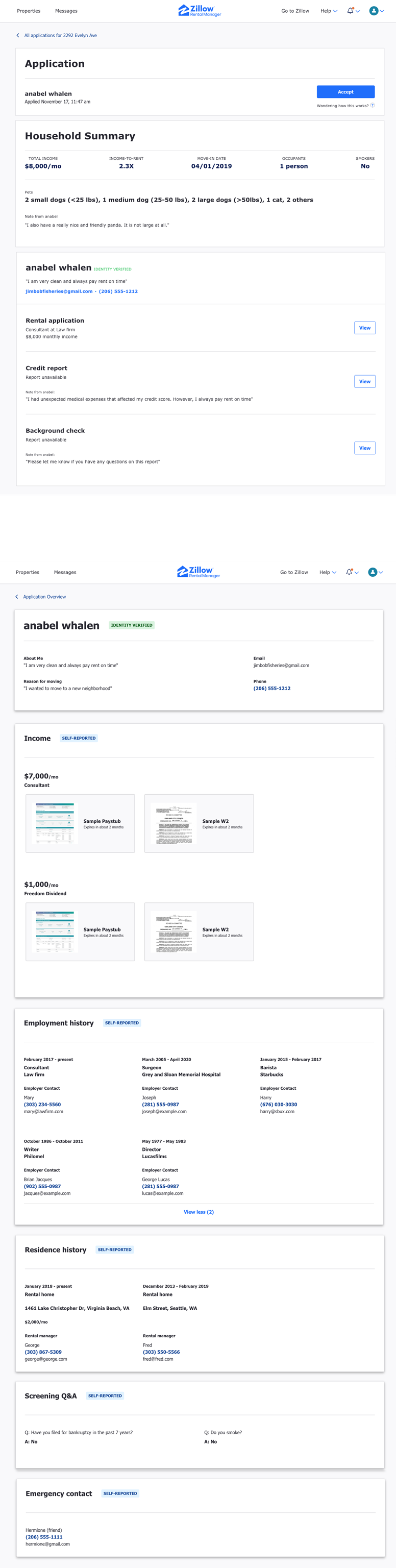
Once the application is submitted, screening reports are provided by Experian and CIC. In some cases, background checks are modified to reflect state and local legal requirements. See more information here
The credit report includes a credit score alongside a comprehensive overview of the applicant's credit history. View a sample report.
The background check includes a national criminal search, sex offender search, and housing court records (categorized within Civil Search). View a sample report.
What is rent to income ratio?
The rent to income ratio is how many times over the rental price the tenant makes in gross income per month. For example, if someone were to make $4,500 a month, and the rent was $1,500 a month, their income to rent ratio would be 3x, meaning that they make three times the amount that rent costs each month.
The benefit of using a rent to income ratio is that it allows both landlords and tenants a simple and clear way to gauge the financial feasibility of making the rent payments.
Zillow application calculates your renters rent to income ratio to help you and your renter determine if this rental is right for them.
What does it mean that the renter has a “portable” application?
It means that the renter only has to pay once, but can submit an application to as many participating landlords as they want in a period of 30 days. The information is pulled only when the renter submits an application to a landlord. This ensures that you will always have the most recent and up to date information.
How do I Approve an Application?
After reviewing an application you can invite a renter to move forward with the leasing process by approving their application. To approve an application follow these steps:
- Open the application
- Select Take Action
- From the drop down menu select Approve application
- You can enter a personalized message to send to your approved applicant by editing the Preview and customize your message: field and clicking Send Message
In the event the applicant or landlord chooses not to move forward with the lease, the landlord can use the same directions listed above to select the other drop down option Decline.
How do I Decline an application?
In the event an applicant does not meet the requirements to move forward with the leasing process and you need to decline their application, follow the steps below:
- Open application
- Select Take Action
- From the drop down menu select Decline application
- Select the checkmark boxes to indicate why the application is being declined, click Continue
- Agree to follow the community standards in the Good Neighbor Policy and Respectful renting Pledge and read all Legal Considerations for landlords.
- You can enter a personalized message to send to the declined applicant by editing the Preview and customize your message: field and clicking Send
A few things to note, If you decline an application in error, please note the renter will need to reapply in order for you to see their application and screening reports again.
How do I contact an applicant?
Once you receive an application and have verified your identity you can contact the applicant directly from their submitted application. To contact the applicant:
- Log into your Zillow Rental Manager account associated with applications
- Select your listing
- Select the Applications tab
- Select View more
- Select the application
- Select Message icon in Application overview section
How do I disable applications?
If you have your own external application process and do not wish to use Zillow applications, follow the directions below to disable Zillow applications:
- Log into your Zillow Rental Manager account
- Select your listing
- Click on the Applications tab
- Click View more
- Toggle applications Off as seen below:
Why did I receive a Zillow application when I do not accept Zillow applications?
If you received a Zillow application in error, this means your Zillow applications are currently enabled. Please use the directions in How do I disable applications to ensure they are disabled moving forward.
Can I request a refund on the renter's behalf?
If a renter applied and wants a refund, please have them contact our support team directly at rentalapplications@zillow.com.
How can I help my applicant troubleshoot application issues?
Below are common scenarios that your applicants may run into and how to troubleshoot.
Your renter is having trouble verifying their identity or they’re unable to complete their application because they’re locked out.
There are a few scenarios where a renter may be unable to verify their identity in our system. These include not having sufficient credit history, having a fraud alert or a security freeze associated with their credit file, or being outside of the country.
To try and troubleshoot with them, if they are connected to WIFI, please have them try disconnecting from the WIFI and use cellular data instead.
You can also have your renter start by double-checking details such as their name and current address. It may also be helpful to have them try a previous address. Please note that any addresses or phone numbers entered need to be US addresses.
Have they entered their social security number? Are they within the US? If they are outside the US they will either need to use a U.S. IP Address VPN to complete the screening reports section or wait until they are back within the US. Experian, a credit-reporting agency, may also be able to help them understand what is associated with their credit file that could be preventing them from completing their application.
You can provide Experian's contact information to your renter for further troubleshooting:
https://www.experian.com/corporate/about-experian.html
(1-888-397-3742 and/or 1-800-509-8495).
Your renter needs to make changes to their application.
A completed rental application cannot be changed. If you’d prefer that they make the appropriate changes to their application, start by having them visit the renter hub to withdraw their application. Next, visit the Applications tab of your listing and click Send application link to send your renter a new invitation. They won’t be charged again for a new application so long as it’s still within 30 days of their original purchase.
They can access their rental applications hub here.
Your renter is having trouble paying for their application.
Please have the renter attempt to process their application using Google Chrome or Mozilla Firefox. For more information, please visit this article: How does the renter pay their application fee
Your renters' background report is showing as unavailable.
For more information, please visit this article: Why does a tenant’s background check show as unavailable?
Your renter submitted their application, but you don't see it.
For more information, please visit this article: A renter said they applied when will I receive their application